Practice setup · 1 short video
How do I move my practice's patient data into Medipyxis?
Practice Onboarding imports your patient records from your old EHR system across nine guided steps: patients first, then insurance, medications, allergies, conditions, emergency contacts, wounds, clinical documents and historical wound photos, and past visits. You see every row before it is saved, rows with problems or identity collisions are held with a reason, and a results file tells you exactly what was imported.
The video has no sound, and a text description is below it. Every patient in it is a made-up test patient; staff names and emails are blurred.
- How does the import work, step by step?
- What can I import, and in what order?
- What is not imported?
- What does the results file look like?
- Screenshots
- Questions and answers
How does the import work, step by step?
Each step has its own CSV template. Upload your file, check that its columns are matched to the right Medipyxis fields, then review every row. Rows with a problem are marked in red, and you can fix them on screen or skip them. After the import, a summary shows what was imported, what was skipped and why, and a results CSV gives each new patient its Medipyxis ID.
Why it matters: A new practice starts with its patient list, active wounds and history already in place, without retyping them. One bad row never blocks the rest, and nothing is dropped without a reason you can see.
Text description of this video
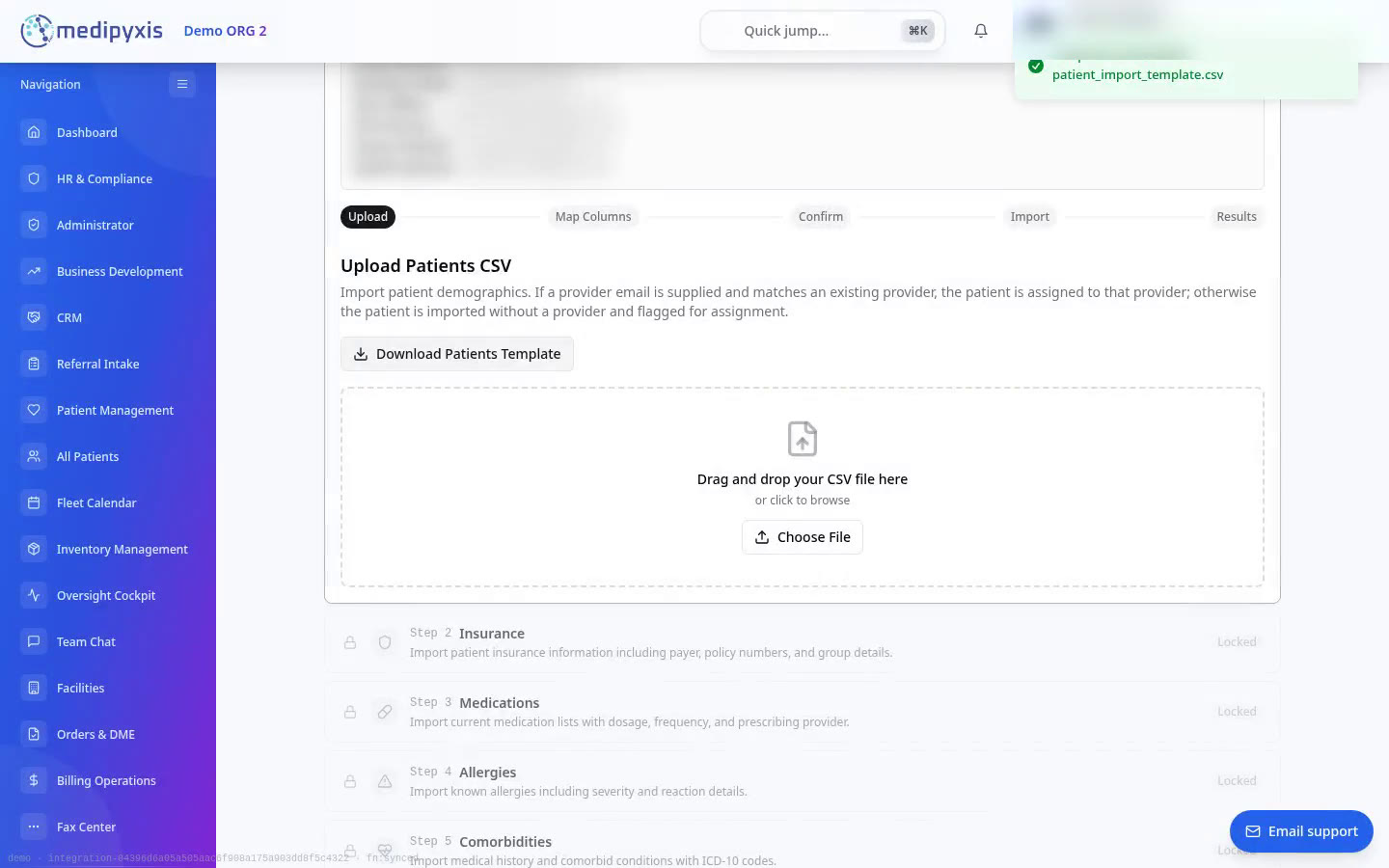
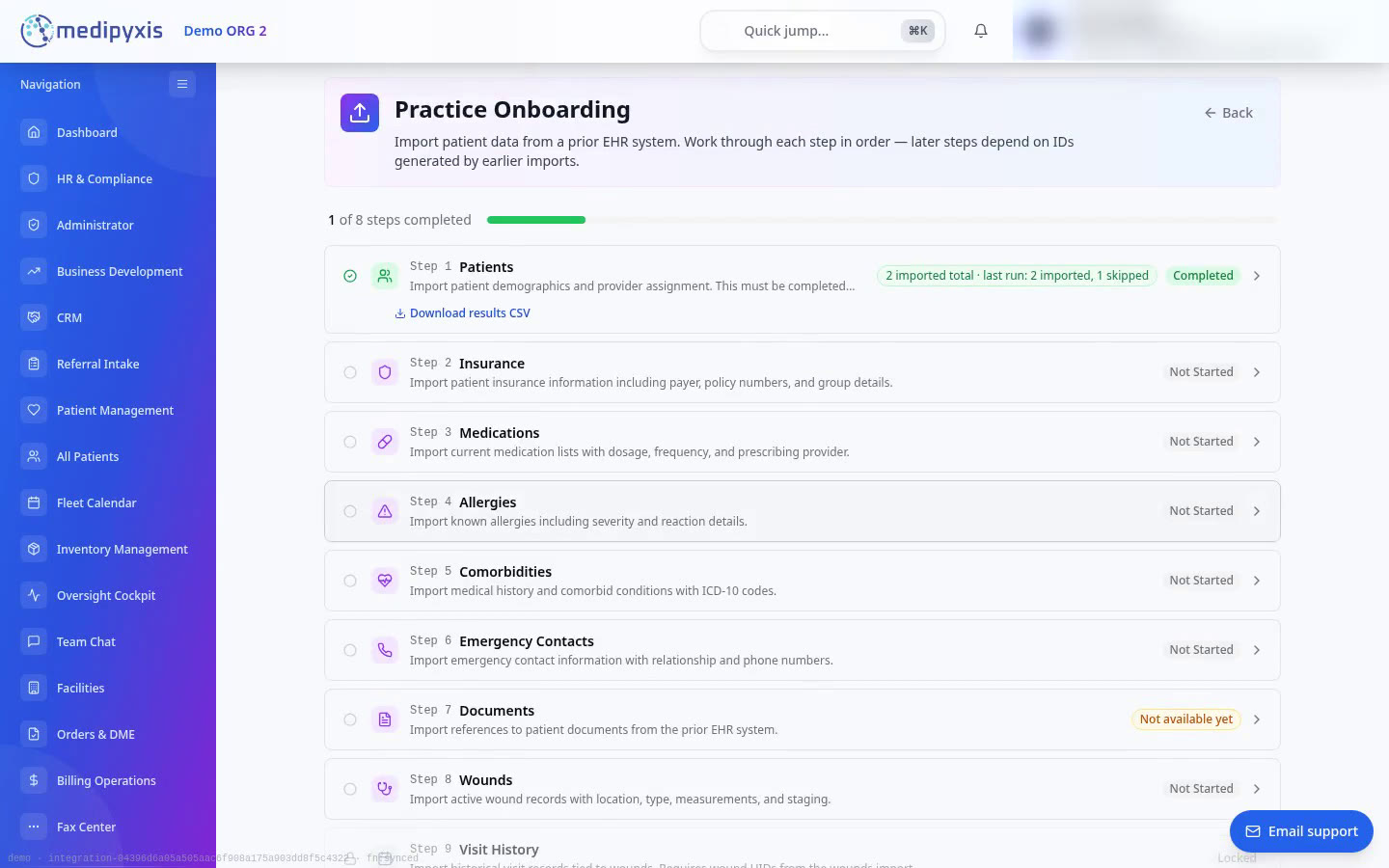
- 0:00 The Practice Onboarding page (Administrator, then Practice Onboarding) lists nine import steps. Step 1, Patients, is open to start; the others are locked until patients are imported. Visit History waits for Wounds.
- 0:12 Step 1, Patients, is opened. A panel lists the providers at this facility and their Medipyxis emails, blurred in this video. Below it is the upload area.
- 0:19 Download Patients Template is clicked and the template CSV downloads. It has one column per field, with an example row.
- 0:22 A test CSV with six made-up patients is uploaded. Map Columns shows every column in the file matched to a Medipyxis field automatically: 10 of 10. Required fields are starred. Confirm Mapping is clicked.
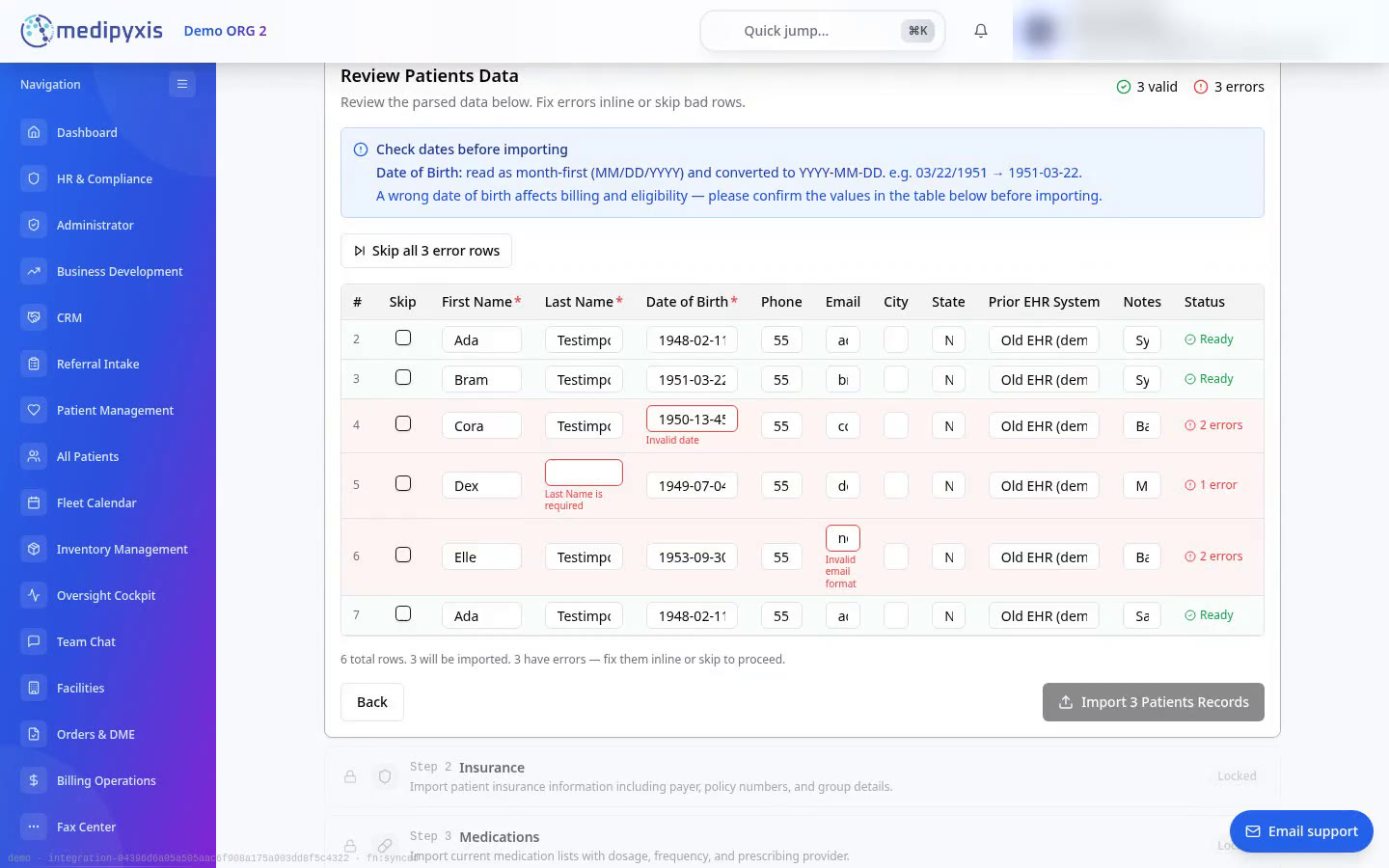
- 0:36 Review Patients Data shows 3 valid rows and 3 errors. Row 4 has a birth date that does not exist, row 5 has no last name and row 6 has an email address that is not valid. A note explains how dates were read (month first) and asks you to check them.
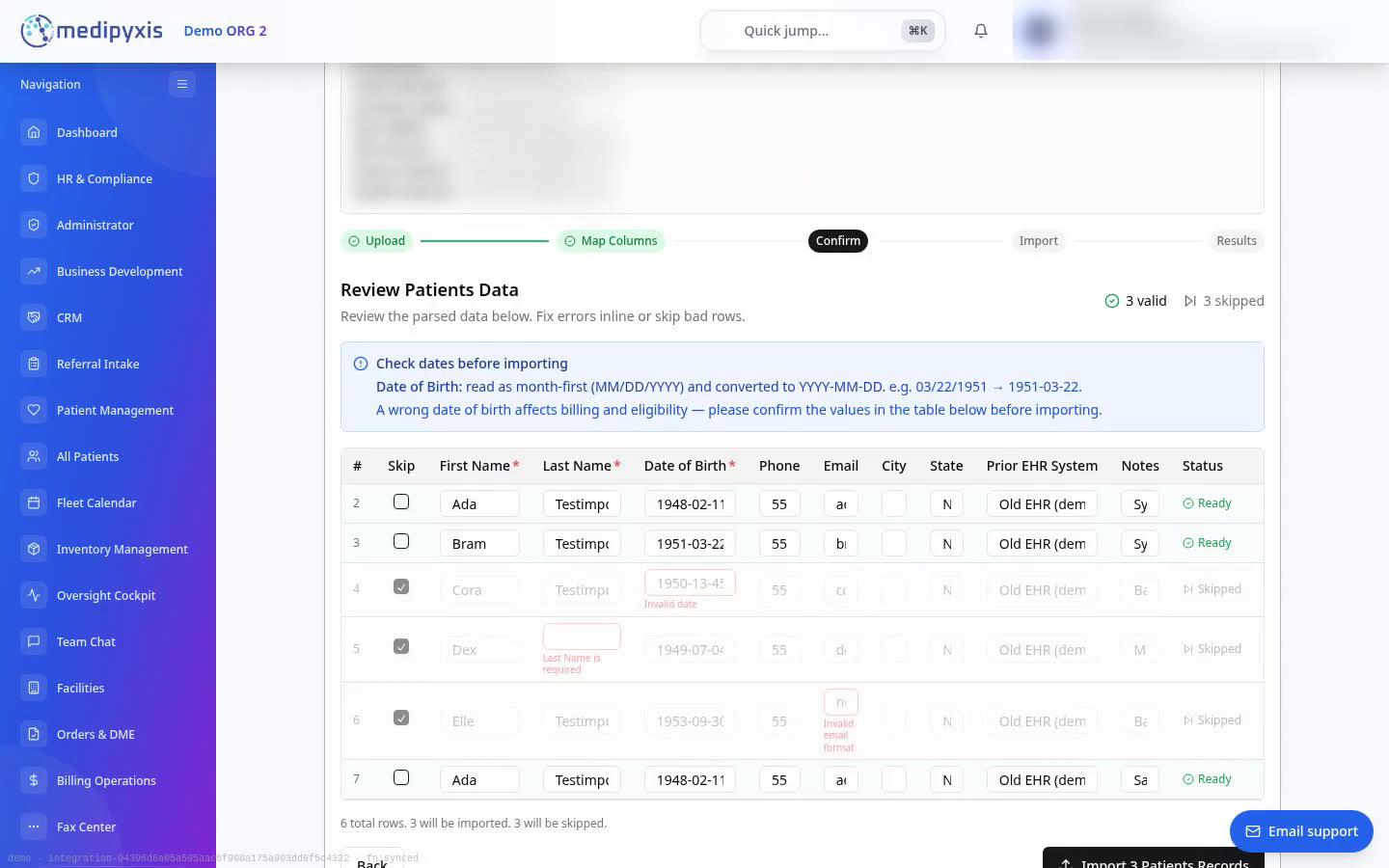
- 0:47 Skip all 3 error rows is clicked. The three rows are greyed out and marked Skipped. The button now reads Import 3 Patients Records.
- 0:51 The import runs.
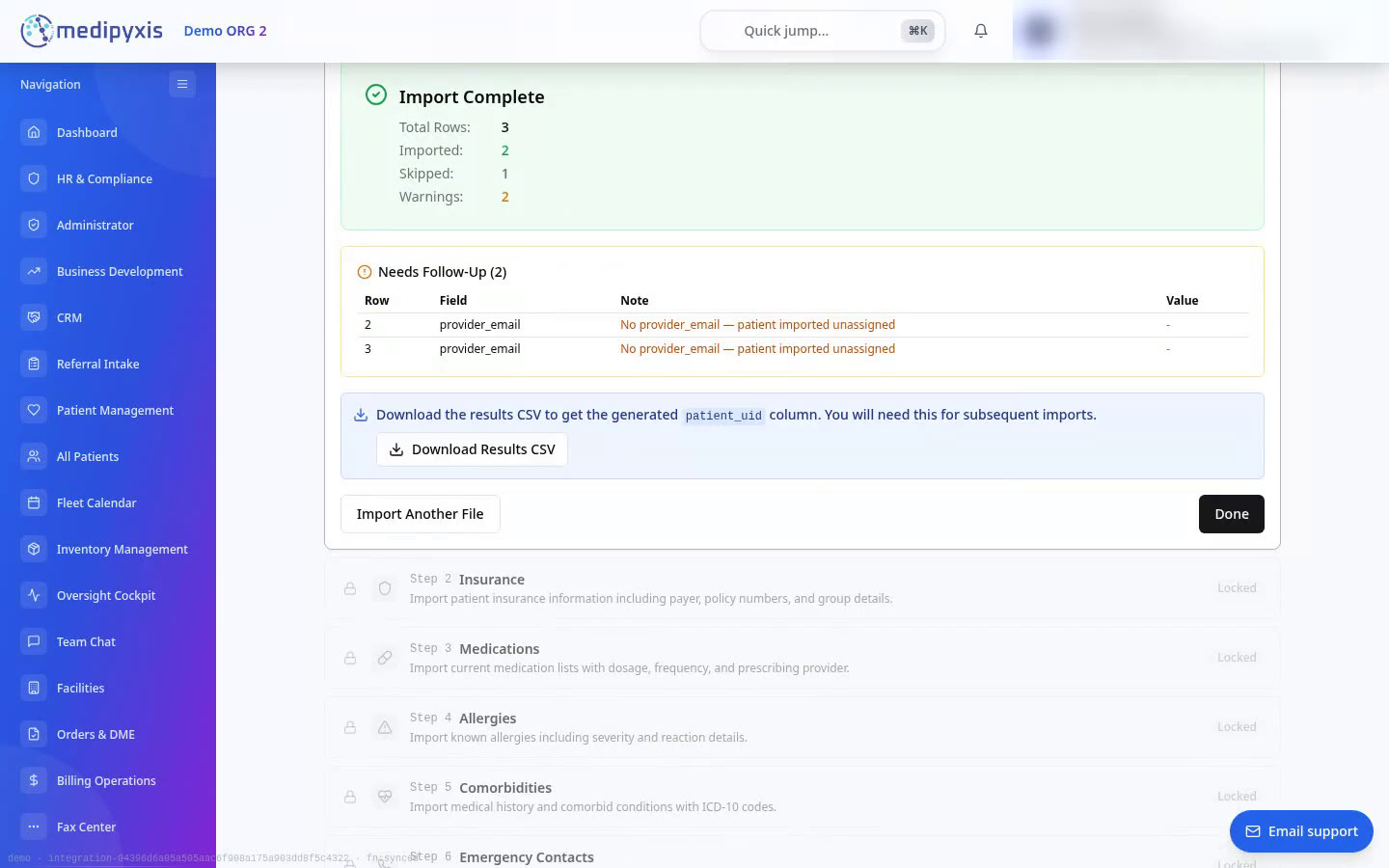
- 0:54 Import Complete: 3 rows sent, 2 imported, 1 skipped, 2 warnings. The skipped row was the same patient listed twice (same name and date of birth), so it was not created a second time. Needs Follow-Up lists the two new patients that had no provider email: they were imported without a provider and need one assigned.
- 1:04 Download Results CSV is clicked. The file is your original rows plus a patient_uid column with each patient's new Medipyxis ID, which the later steps use.
- 1:07 Done returns to the step list. Patients is marked Completed (2 imported, 1 skipped) with a Download results CSV link, so the file can be downloaded again later. Steps 2 to 8 are now open (and Step 9, Past Visits, opens once Step 7, Wounds, is completed).
What can I import, and in what order?
Nine steps, each with its own CSV template. Patients come first; steps 2 to 8 open once patients are imported, and visit history opens once wounds are imported. For the step-by-step walkthrough, see Onboard a practice with the Practice Onboarding importer. For every column name, required flag, accepted value, prior_ehr_* duplicate-handling rule, and the 8 consent_* patient consent attestation columns, see the Practice Data Import CSV templates and column reference.
- 1. Patients (
patient_import_template.csv): Names, dates of birth (YYYY-MM-DD), contact details, address, assigned provider (provider_email), optional prior EHR identifiers (prior_ehr_system,prior_ehr_mrn,duplicate_decision,force_distinct_patient), and optional patient consent attestation columns (consent_on_fileand 7 supportingconsent_*fields). See the Step 1 column & consent breakdown. - 2. Insurance (
insurance_import_template.csv): Payer, subscriber/member ID, policy and group numbers linked topatient_uid. - 3. Medications (
medications_import_template.csv): Current medications with dose, route, frequency and prescriber linked topatient_uid. - 4. Allergies (
allergies_import_template.csv): Known allergies with allergy type, severity and reaction linked topatient_uid. - 5. Conditions (
conditions_import_template.csv— Comorbidities): Medical history and conditions with ICD-10 codes linked topatient_uid. - 6. Emergency Contacts (
contacts_import_template.csv): Name, relationship, phone number and primary contact flag linked topatient_uid. - 7. Wounds (
wounds_import_template.csv): Historical wounds with anatomical location, wound type, baseline measurements (period-decimal cm) and staging (produceswounds_import_results.csvwithwound_uid). - 8. Documents & Historical Wound Photos (
documents_manifest.csv/wound_photos_manifest.csv+ ZIP archive): Clinical PDFs/TIFFs (stored inpatient-documentsunderimported-records/) and historical wound photos (stored inwound-imagesunderhistorical/), linked topatient_uidand optionallywound_uid/wound_id. - 9. Past Visits (
visit_history_import_template.csv— Visit history): Past visits linked topatient_uidandwound_uid/wound_id. Imported as read-only history (visit_import_history).
What is not imported (and what safeguards apply)?
- Imported visits are read-only history (
visit_import_history). You can view past visits on the patient's chart, but they cannot be edited, signed, or billed as active Medipyxis visits. New visits are documented in Medipyxis as usual. - Historical wound photos are isolated from live clinical assessments. Photos uploaded in Step 8 are stored in
wound-imagesunderhistorical/onwound_import_history.photo_urlsand never create or overwrite livewound_assessmentrecords. - Strict preflight & identity-collision safeguards. Excel
sep=preamble lines are stripped automatically; mixedMM/DD/YYYYandDD/MM/YYYYslash dates, impossible calendar dates (such as2026-02-31), and decimal-comma measurements (such as2,5instead of2.5) are blocked before saving; and patients sharingfirst_name + last_name + date_of_birthwith conflicting secondary identifiers (subscriber_id,mrn,ssn_last4,phone,address, oremail) are quarantined (PATIENT_IDENTITY_COLLISION) for disambiguation rather than silently merged.
What does the results file look like?
The results file from the video (made-up test patients; some columns, and the end of each ID, left out here). Imported rows get a patient_uid. Rows that were skipped for an error have it blank. The duplicate Ada row gets the ID of the patient created from row 2, not a new one.
| first_name | last_name | date_of_birth | notes | patient_uid |
|---|---|---|---|---|
| Ada | Testimport | 1948-02-11 | Synthetic test patient | 65c47281… |
| Bram | Testimport | 03/22/1951 | Synthetic test patient | 5edb01d0… |
| Cora | Testimport | 1950-13-45 | Bad birth date on purpose | (blank) |
| Dex | 1949-07-04 | Missing last name on purpose | (blank) | |
| Elle | Testimport | 1953-09-30 | Bad email on purpose | (blank) |
| Ada | Testimport | 1948-02-11 | Same patient listed twice | 65c47281… |
Screenshots
Questions and answers about importing practice data into Medipyxis
What can I import into Medipyxis from my old EHR?
Nine categories in dependency order: (1) Patients, (2) Insurance, (3) Medications, (4) Allergies, (5) Conditions / Comorbidities, (6) Emergency Contacts, (7) Wounds, (8) Documents & Historical Wound Photos (ZIP archive + manifest CSV), and (9) Past Visits (Visit History). Patients go first because every later step links its rows to the patient_uid created in Step 1. Wounds go in Step 7 so Step 8 and Step 9 can attach historical photos, wound-linked documents, and past visits to each imported wound_uid or wound_id.
What happens to rows with errors?
Before anything is saved, every row is checked. Excel sep= preamble headers are stripped automatically, and rows with missing required fields, impossible calendar dates (such as 2026-02-31), mixed MM/DD/YYYY and DD/MM/YYYY date formats, decimal-comma measurements (such as 2,5 instead of 2.5), or invalid emails are marked in red with the exact reason. You can correct them on screen or skip them and import the rest. Skipped rows stay in the results file without a Medipyxis ID so you can fix them in your spreadsheet and import them later.
Will importing the same patient twice create a duplicate?
No. Re-importing the same patient reuses the existing chart and returns its patient_uid in the results CSV. Furthermore, if two rows share the same first_name, last_name, and date_of_birth (DOB) but have conflicting secondary identifiers (subscriber_id, mrn, ssn_last4, phone, street address/ZIP, or email), Medipyxis quarantines the row with a PATIENT_IDENTITY_COLLISION diagnostic instead of silently merging two distinct people. You can disambiguate twins, family-plan dependents, or common-name patients using patient_uid, force_distinct_patient=true, or duplicate_decision.
What is the results CSV for?
It is your file with one column added: each patient's new Medipyxis ID (patient_uid). The insurance, medication, allergy, condition, emergency contact, wound, and document steps use that ID to attach their rows to the right patient. Step 7 (Wounds) produces wounds_import_results.csv with wound_uid values for Step 8 (Documents & Historical Wound Photos) and Step 9 (Past Visits). The latest results file can be downloaded again from the step's card at any time.
What if a patient has no provider in the file?
The patient is still imported without a provider and listed under Needs Follow-Up so you can assign one. To assign providers during the import, put each provider's Medipyxis email in the provider_email column.
Are documents and wound photos imported?
Yes, in Step 8 (Documents & Historical Wound Photos). Upload a ZIP archive together with documents_manifest.csv or wound_photos_manifest.csv. Clinical PDFs and TIFFs are stored in the private patient-documents bucket under imported-records/ and indexed in prior_ehr_record; historical wound photos (JPEG, PNG, WebP, HEIC) are stored in the private wound-images bucket under historical/ and appended to wound_import_history.photo_urls (never mixed into live clinical wound_assessment records).
Can I edit or bill imported visits?
No. Imported visits come in as read-only history (visit_import_history): you can see them on the patient's record, but they are not active Medipyxis visits, so they cannot be edited, signed or billed. New visits are documented in Medipyxis as usual.
Where can I see every CSV column and how patient consent attestation works?
See Practice Data Import CSV templates and column reference for the complete column-by-column breakdown of all 9 templates. In Step 1 (patient_import_template.csv), the 8 optional consent_* columns gate on consent_on_file: when blank or no, no consent is recorded and the other 7 columns are ignored; when yes, Medipyxis records an external_attested treatment and billing consent under the importing admin's account. Only attest consent_on_file = yes when your practice holds its own signed consent form for that patient — never use a nursing facility's admission paperwork.
Who can run the import?
An organization administrator, from Administrator, then Practice Onboarding. Data is imported into the facility you are working in.