Inventory Management overview
Understand the areas of the Inventory Management hub and the key terms that apply across all of them.
Graft and skin substitute inventory tour: Product Catalog and Receiving workflow.
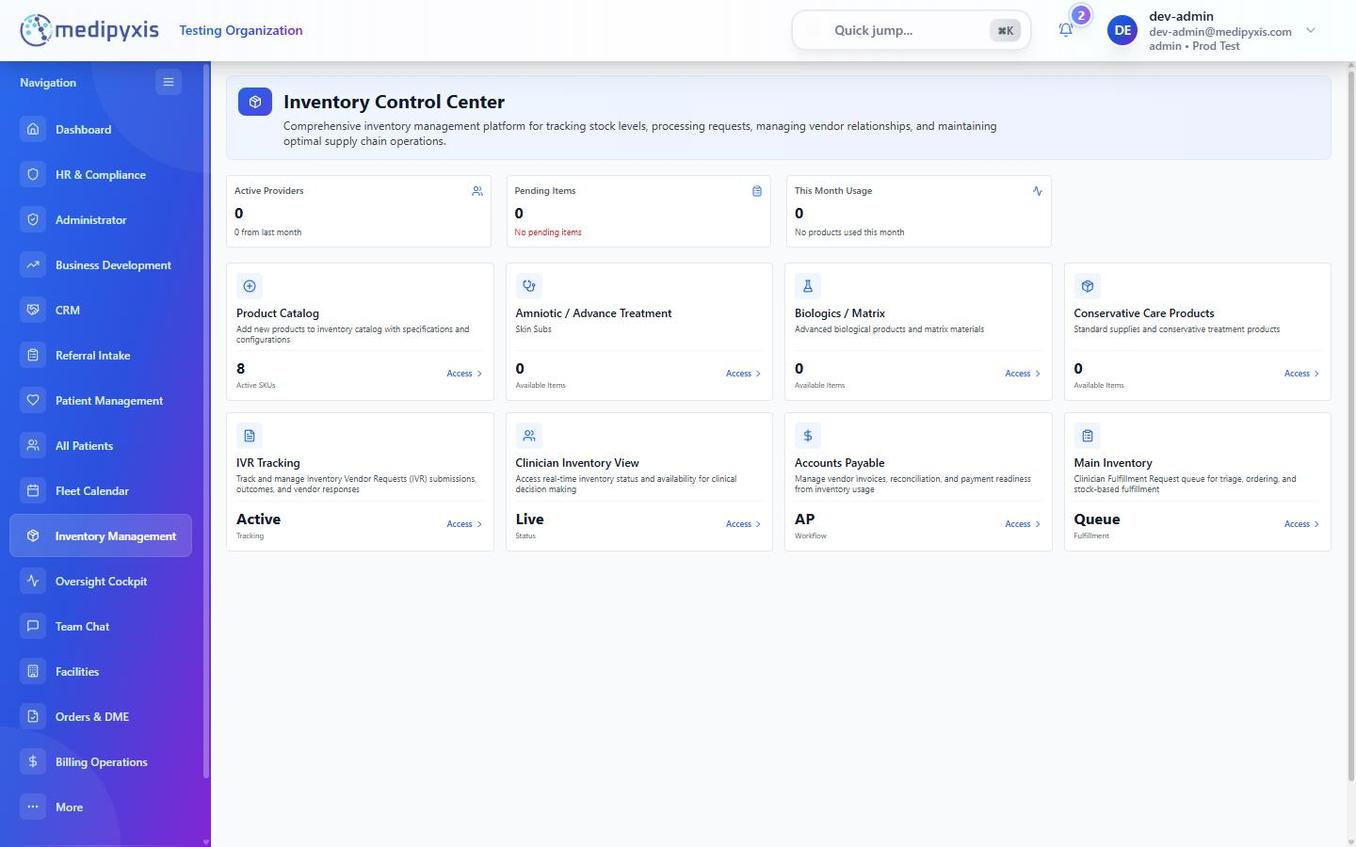
Inventory Management hub. Each tile opens its dedicated workspace.
Key terms
UIN — Unique Inventory Number
A UIN (Unique Inventory Number) is a system-generated identifier assigned to a single physical unit of a product at the moment it is received into inventory. No two units share a UIN, even when they come from the same lot or shipment. The UIN travels with the graft or supply item through receiving, storage, and patient application, and is scanned in the Procedures & Supplies section of the Visit Wizard to link the unit to a clinical encounter.
PAR level — Periodic Automatic Replenishment
A PAR level (Periodic Automatic Replenishment threshold) is the minimum quantity of a product that should be on hand at a facility. When stock falls to or below the PAR level, the system surfaces a replenishment alert so a vendor_coordinator or admin can reorder before a stockout occurs.
The hub tiles
| Tile | Purpose |
|---|---|
| Product Catalog | Master list of every product your organization has configured (with a Products tab and a Vendors tab). Add products and edit SKU/HCPCS metadata here. |
| Amniotic / Advance Treatment | Receiving and management for amniotic membrane and advance-treatment products. |
| Biologics / Matrix | Receiving and management for biologic matrix products (HCPCS + manufacturer lot-format validation). |
| Conservative Care Products | Receiving and management for non-graft supplies (dressings, offloading, consumables). |
| PRP | Platelet-rich plasma kits. |
| Ultrasonic Mist (UM) | Ultrasonic mist therapy cartridges. |
| IVR Tracking | Tracks IVR submissions, outcomes, and vendor responses. See IVR Tracking. |
| Clinician Inventory View | A read-only, role-filtered view of what's available at a clinician's facility, without cost or AP data. |
| Accounts Payable | Vendor invoice intake, matching, payments, and disputes. See Accounts Payable. |
| Main Inventory | The facility's stock and fulfillment view for what is physically on hand. |
Other tools
- FDA HCT/P Recall Lookup — a lookup tool (not a hub tile) for checking received tissue products against FDA recall data.
- Bulk operations — shipment logging, vendor receiving, manual receipt, and provider assignment from a single landing page. See Bulk inventory workflows.
How the tiles connect
- A product is defined in Product Catalog with its SKU, HCPCS, and category.
- A shipment is received through the appropriate category tile (Amniotic / Advance Treatment, Biologics / Matrix, Conservative Care Products, PRP, or Ultrasonic Mist), generating a UIN for each unit.
- If a payer requires prior authorization for a graft, an IVR is tracked in IVR Tracking.
- Received units appear in inventory and become selectable in the Visit Wizard's Procedures & Supplies section.
- Vendor invoices for received shipments are handled in Accounts Payable.
Related
Auto-rendered from related: in frontmatter.