Wound Cockpit overview
The Wound Cockpit is the patient-level wound management page in Medipyxis. It lists every wound case for the selected patient on one screen so you can see status, compliance, and measurements at a glance, and start or continue a visit from any wound.
Before you start
- You are viewing the chart of a wound care patient.
- The patient has at least one wound record (created during intake or via the Add Wound flow).
Page layout
Open the Wound Cockpit from the patient chart. The page shows:
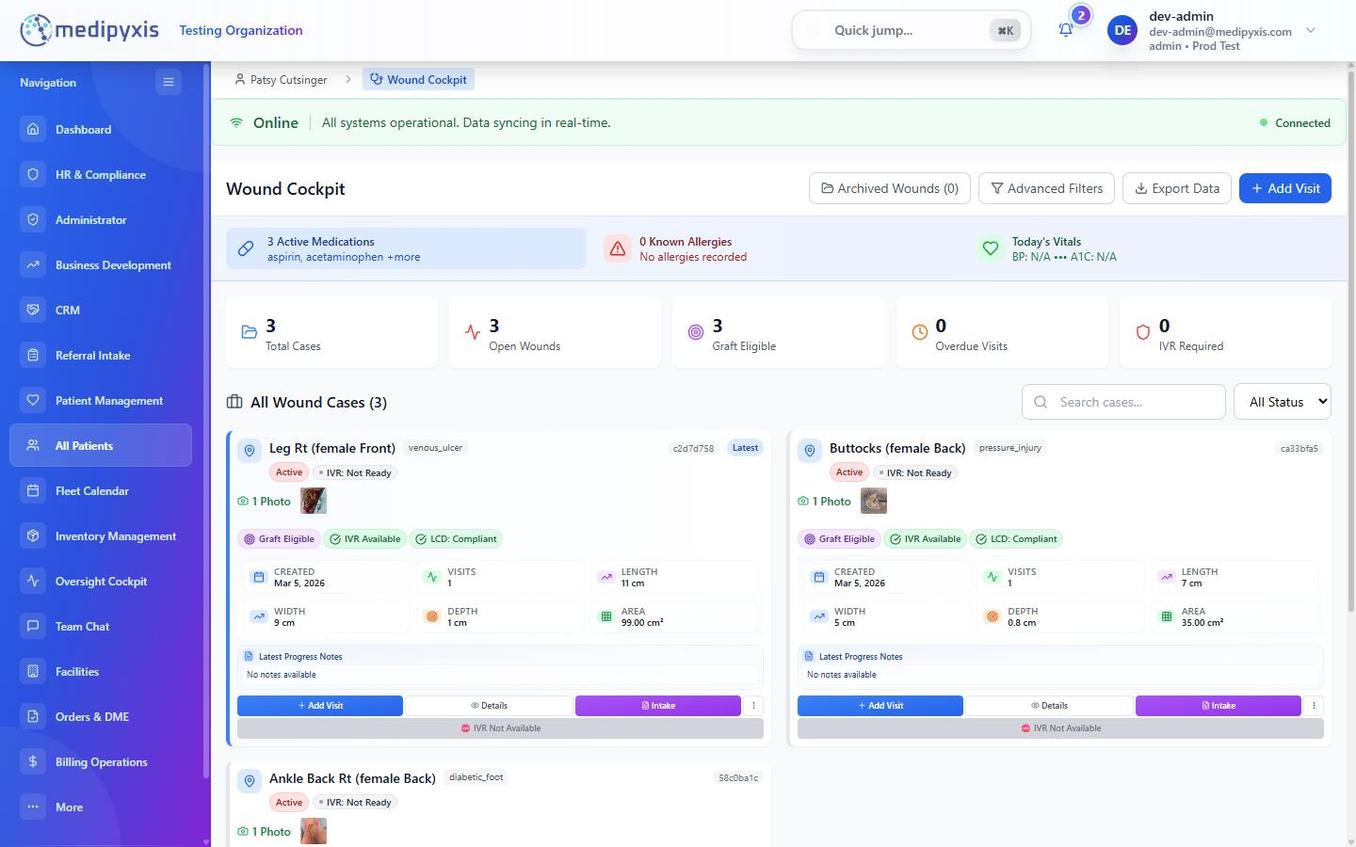 The Wound Cockpit. The top banner summarizes medications, allergies, and vitals; metric counters show case volume; each wound is a card with compliance pills and measurements.
Patient summary banner
Three cards at the top give immediate clinical context:
- Medications — count of active medications, with a short list.
- Allergies — known allergy count.
- Vitals — today's vitals (for example, blood pressure and A1C) where recorded.
Metric counters
Five counters summarize the patient's wound caseload:
- Total Cases
- Open Wounds
- Graft Eligible
- Overdue Visits
- IVR Required
Top actions
- Archived Wounds — view wounds that have been archived.
- Advanced Filters — filter the case list.
- Export Data — export the current case list.
- Add Visit — start a new encounter (also available on each wound card).
Wound case cards
Each wound appears as a card showing:
| Element | What it shows |
|---|---|
| Location & etiology | The wound's anatomic location and etiology badge (for example, venous_ulcer, pressure_injury, diabetic_foot). |
| Wound ID | The internal wound record ID. |
| Status pills | Active, plus IVR readiness (IVR: Not Ready or IVR Available). |
| Photo | A thumbnail if a photo is on file, with the count. |
| Compliance pills | Graft Eligible, IVR Available, and LCD: Compliant — the current compliance and eligibility status. |
| Metrics grid | Created date, number of visits, Length, Width, Depth, and Area (cm²). |
| Progress notes | The latest progress note, if any. |
| Actions | Add Visit, Details, Intake, and an overflow menu. |
Starting a visit from a wound card
Click Add Visit on a wound card to start a new encounter for that wound. The Visit Wizard opens with that wound selected in the Wound Assessment step (step 7).
Compliance and IVR status pills
The colored pills on each card summarize readiness at a glance:
- LCD: Compliant (green) — the wound's documentation meets the LCD compliance checks.
- Graft Eligible (purple) — the wound qualifies for graft/advanced therapy consideration.
- IVR Available (green) / IVR: Not Ready (gray) — whether the wound is ready for an Insurance Verification Request for advanced therapy.
A wound that is not IVR-ready shows IVR: Not Ready and IVR Not Available on the card's status bar. Resolve the outstanding documentation (measurements, tissue percentages, prior-treatment history) to advance IVR readiness.
Roles and permissions
| Role | What they can do |
|---|---|
clinician |
View wounds and compliance status; start visits. |
clinical_manager |
View wounds and compliance status. |
medical_director |
View wounds and compliance status; review attested notes. |
admin |
View everything in their facility. |
Roadmap — planned wound cockpit features
The following are planned but not yet live in the current product. Do not describe them to clinicians as available until they ship.
- Case-Manager Readiness — a checklist button that evaluates whether a wound is ready for case manager review (conservative care documented, failed prior therapies listed, recent measurements, tissue percentages, comorbidities current, medical necessity statement, recent photo).
- Protocol progression timeline — when a wound is enrolled in a Medipyxis Protocol Engine treatment protocol, a timeline showing the current stage, days at stage, and progression criteria.
- Wound Timeline (merged Visit Log) — a single chronological feed of all wound events (visits, IVR requests, tissue applications, photo captures, write-offs, addenda).
- IVR Readiness Modal — a modal that opens pre-IVR with an auto-populated checklist and payer/product fields for submitting an Insurance Verification Request.
When these ship, this page will be updated with the live workflow.
Troubleshooting
| Symptom | Likely cause | What to do |
|---|---|---|
| No wounds appear on the page | The patient has no wound records | Create a wound during intake or via the Add Wound flow. |
| Add Visit is disabled | A visit is already in progress for today, or the wound is archived | Check for an existing draft; or restore the wound from Archived Wounds. |
| LCD: Compliant pill is missing | Wound documentation is incomplete | Complete the Wound Assessment (step 7) measurements and tissue percentages, then save. |
| IVR shows "Not Ready" | Required readiness data is missing | Complete measurements, tissue composition, and prior-treatment history; the pill updates on save. |
Related
Auto-rendered from related: in frontmatter.